

Adjust a trade
An open trade changes: you add a hedge, take profit on half, or roll the short strikes out. In Tented every change is a scenario you model first and then commit. The risk graph shows the trade with the change on it before anything is recorded or sent. The trade stays one trade: each change becomes a labeled action in its record, such as “Hedge”.
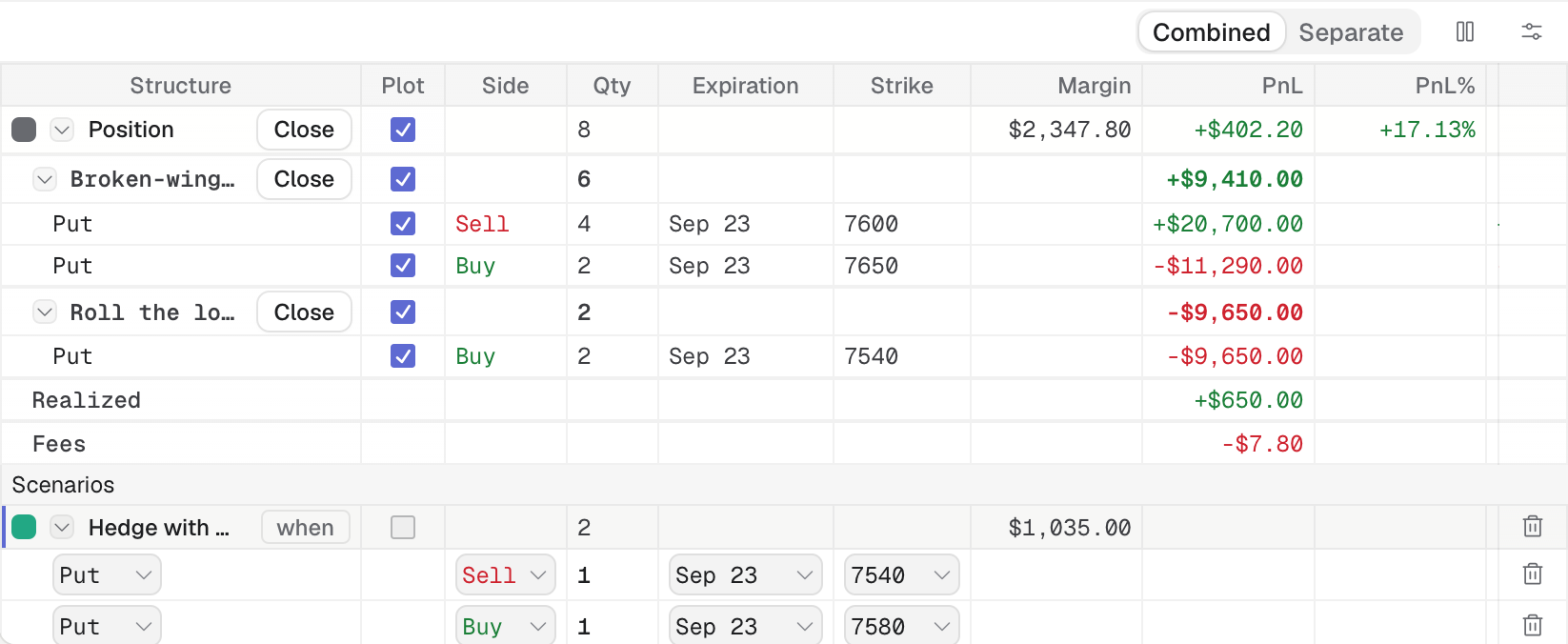
The builder's Position row holds the legs you have; each structure and the whole position has a Close button.
- 1 Position row, with Close
- 2 A structure band, with its own Close
- Open the trade (Trades → its card).
- In the trade builder, add a + Scenario, or click a bid or ask in the Chain tab of the drawer, to add legs. Name the scenario by double-clicking its name: the name becomes the action’s label in the record. See Trade builder.
- Check the risk graph with the scenario ticked in Plot. Add a condition to the scenario if you want Tented to flag when it is time (Scenarios).
- Click Commit in the scenario footer. The dialog, titled “Commit trade — updating #N”, opens with Trade ID set to this trade.
- Choose Save, Send or Save & send (Save, send or both). The Adjustment note records why. Edit plan changes the target, stop or alerts at the same time.
Example: hedge a tested side of the Sep 23 put BWB with a 7580/7540 put spread. Add a scenario with the hedge legs, look at the combined graph, commit it.
If Commit in the scenario footer is greyed out, the scenario has no modeled legs. To close or roll, see Close a trade and Roll a trade.