

Plans and alerts
You decide at entry where you will take profit, where you will cut, and what would make you look at the trade again. A plan records that on the trade: an optional strategy, a target, a stop, alerts and a one-line note. Tented then holds you to it without placing an order for you. It draws the target and stop on the risk graph, flags the trade card when one is reached, and watches the alerts in the background, including while you are on another view or another application.
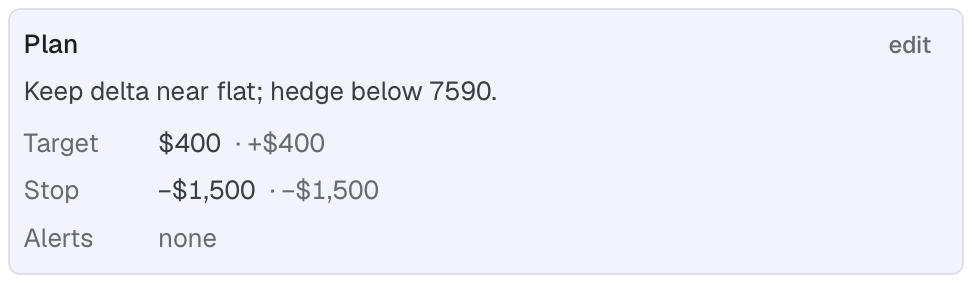
The Plan card in the trade's Record tab, read back in the units you stated.
- 1 Edit the plan
- 2 Target, with its dollar equivalent
- 3 Stop
- 4 Alerts
How traders use it
Section titled “How traders use it”- Set the exit before you enter. Put a target and a stop in the Commit dialog’s plan. The graph draws both lines and the card flags the trade the moment either is reached.
- Size the stop in your own unit. “50% of credit”, “10% of margin” or “$1,500”; the dialog shows the other readings as you type.
- Get called when it matters. Add an alert for position delta beyond ±25, short strike delta above 30, DTE reaching 7, or 15:45 New York time. The 15:45 alert fires every day until you remove it, not only on expiration day, so pair it with a DTE alert. Leave Tented open and do something else.
- Reuse a strategy. Write it once (title bar → gear → Strategies); picking it in a plan fills the target and stop.
In this topic
Section titled “In this topic”- Set a target and stop: the plan editor, units, and where the plan shows.
- Alerts: the alert conditions, their watch status and when they fire.
- Notifications: operating-system notifications and what keeps running.